




Mini Cart Module
Woo Mini Cart enhances the customer’s shopping experience by increasing the accessibility of your store’s shopping cart. Assist your customers to save time by preventing them from repeatedly opening the cart pages. Customers can quickly review what they’ve added to the cart, what they want to remove. It is quick, easy, and comfortable to access.
Key Features
Take a look at the versatile settings present within the Mini Cart!

Hover Effects

Product Text Settings

Image Settings

Mini Cart Window

Mini Cart Count

Mini Cart Alignment

Button Settings

Empty cart & Subtotal
01
Design the Mini Cart Display
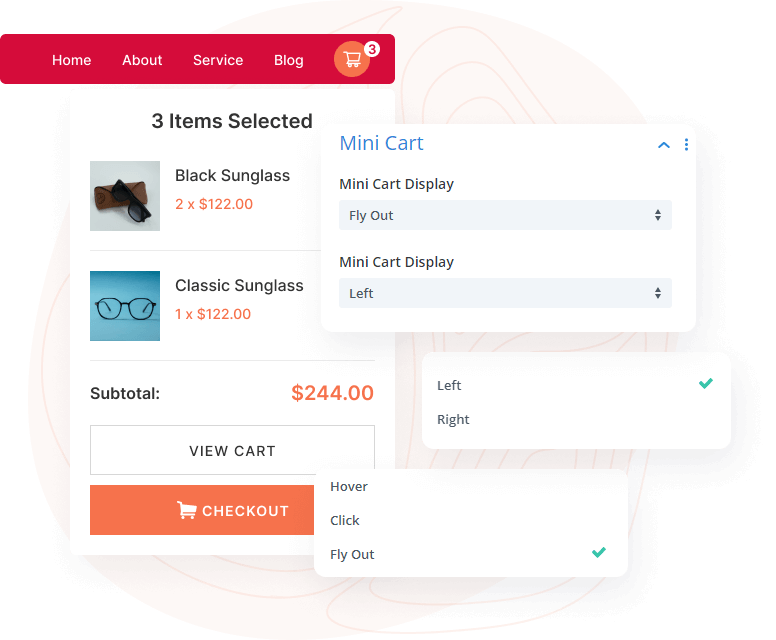
Divi Next has recently introduced a range of features, including hover, click, and flyout options in mini cart display, which enable customers to display their products in a visually stunning way. When the user hovers or clicks their mouse cursor over the icon on a mini cart of an ecommerce website, a small window will appear displaying the items that have been added to the cart and the total price.
Experience Mini Cart Modules Demo
Accessories Box 2
Price range: $50.00 through $90.00Accessories Box
Original price was: $100.00.$1.00Current price is: $1.00.Accessories Box 3
$120.00African American Loafer
$25.00All time cream
Original price was: $35.00.$32.00Current price is: $32.00.Allan Wrestler
$85.00Alloy Steel
$85.00Amazon Box
$50.00



02
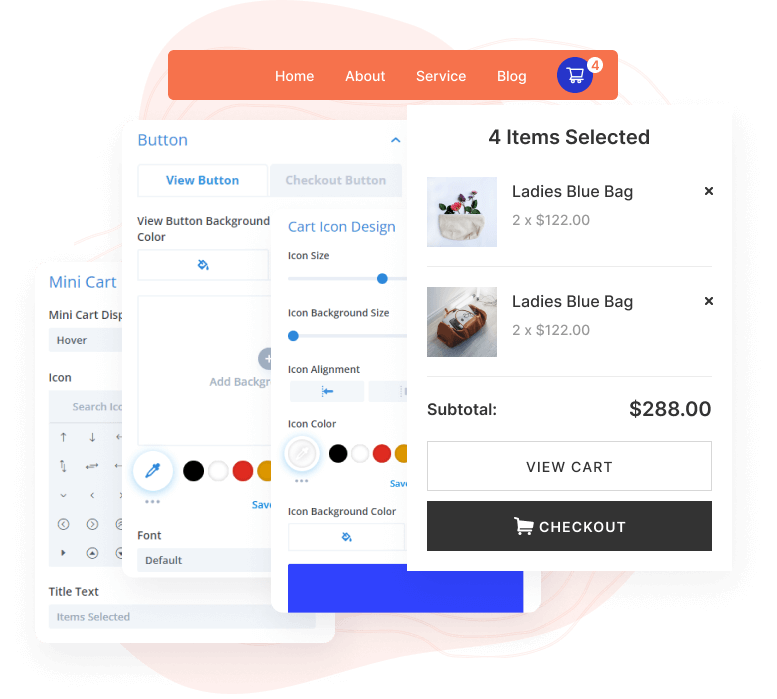
Customize the Mini Cart View Button and Check Out Button
The Mini Cart module’s “view” button enables customers to access a detailed listing of the products in their shopping cart, including item quantities, prices, and additional relevant information. It may lead to a separate page displaying this information.
The “check out” button in the Mini Cart module begins the process of completing a purchase and paying for the items in the cart. When you click, this button may redirect the customer to a page where they can input their billing details, review the order, and confirm the purchase.
03
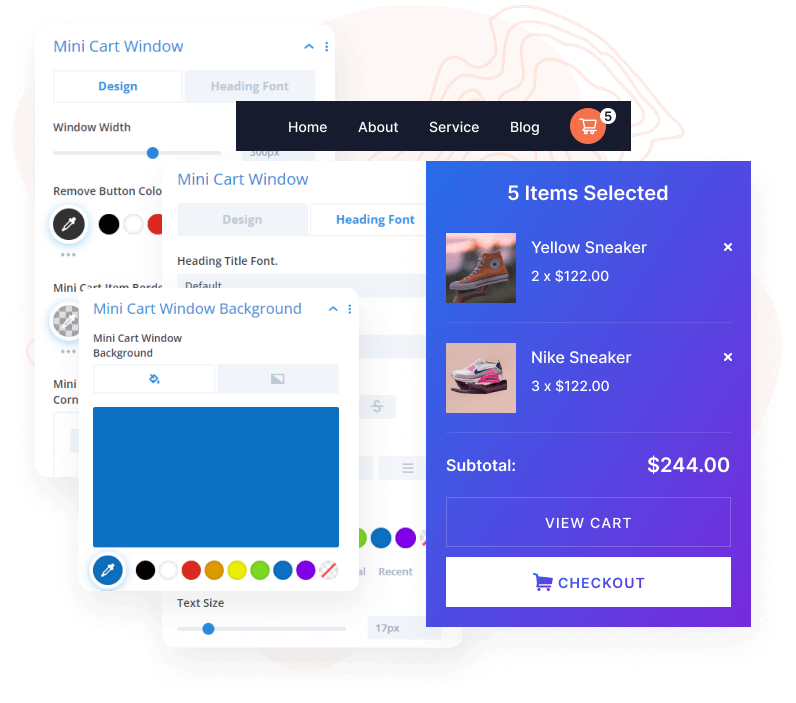
Customize the Mini Cart Window
Woo Essential allows you to easily design the window for the mini cart. The specific design will depend on the overall aesthetic and branding of your website.
Experience Mini Cart Modules Demo
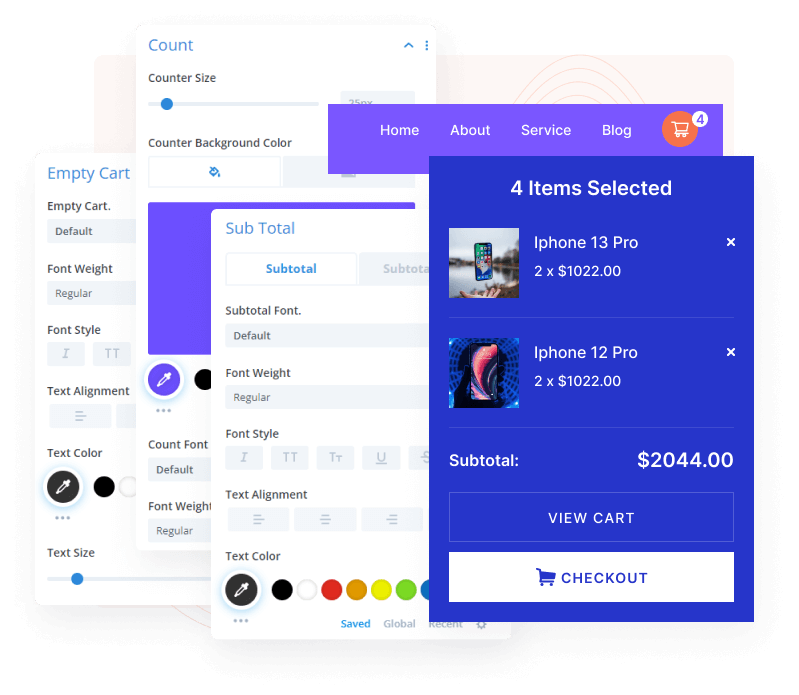
04
Design Subtotal and Count in Mini Cart
The mini cart’s “Subtotal” feature displays the total cost of all items in a customer’s shopping cart. It is prominently displayed in the mini cart module and is calculated by summing the price of each item in the cart. It does not take into account taxes or shipping costs.
The mini cart module includes a useful feature “count” that allows users to easily track the number of items in their shopping cart, helping them keep track of their purchases.
This plugin is an essential part of my web design workflow! It has all the tools I need to help me boost my creativity and overall makes me more versatile! Now I can focus fully on the design-part of every web-creation. Great plugin! Great support-team! I love it!

Wade Warren
This plugin is one of the “must” Divi extensions. It brings so many new options and possibilities in just a few simple clicks. Advanced CSS animations, transitions, and all “WOW” effects that make your site unique. Did I mention their support? Real-time chat with on-the-fly answers and solutions.
Thanks, guys, keep up the good work! Peace!

Jakub Iwo Zalewski
Fully satisfied with my investment! Gotta say I came across a brilliant set of modules within the Divi Essential Plugin! Very user-friendly and loving the adventure going through the 60+ modules! Just wow!
The hard work just shows! The level at which you all are bringing in the new products! Amazing! Truly grateful!

Michael Zakarian
I went for the All-Access Pass and all I can say is Wow. The modules are absolutely amazing. I had a small problem downloading the Woo Commerce modules but the real-time chat support was amazing and had it resolved in minutes, I can’t thank you guys enough, and looking forward to any new modules. Definitely worth buying, Highly recommended 5*

Anthony Rose
Design Your Dream Divi Website with Woo Essential
30-Day Money-Back Guarantee, No Questions Asked!
FAQ
Frequently Asked Question
What is the best definition of WooCommerce & Product?
WordPress has an eCommerce plugin called WooCommerce. WordPress users of small and large businesses can use it to build and design their online store. You can now set up your eCommerce/WooCommerce site under Divi Theme.
How do I install my Woo Essential Plugin?
Just like any other third-party plugin/extension of Divi, you have to download the zip file containing the plugin and upload it.
Here’s an instruction:
- After you download the plugin’s zip file > go to your WordPress ‘Dashboard’
- On the left > go down to ‘Plugins’
- ‘Add New’ > ‘Upload Plugin’
- Finally, select the (.zip) file that has the modules
- When the plugin is uploaded successfully, you will need to ‘Save Changes’ > then click on ‘Activate’.
- Enjoy your Woo Essential Plugin!
Here’s a similar video showcasing the installation process:
https://youtu.be/zb6GCQWMP-0
How do I customize my WooCommerce website using Woo Essential Plugin’s modules?
Once you have installed the plugin, all of the modules within Woo Essential Plugin will appear among the default modules in the Visual Builder.
Do I receive support for the Woo Essential Plugin?
For any support for the Woo Essential Plugin, or if you have purchased other DiviNext products, you can always reach out to us via our support email: support@divinext.com
What theme does Woo Essential Plugin use?
The Woo Essential Plugin is made for all Divi users under Divi Theme by Elegant Themes.
How do you provide support?
You can find answers to the Woo Essential Plugin questions in our documentation. Our aim is to provide self-help resources to empower you to manage your site.
Alternatively, you can start a live chat or submit a ticket directly related to the product you need help with via the Help Desk.
Other Divi Modules in Woo Essential Plugin

Categoy Accordion

Ajax Search

Product Accordion


